


Deploying React app to GitHub Pages
The simplicity of deploying a static website with GitHub Pages is a process that can be easily transferred to React applications. With just a few steps, it’s easy to host a React app on GitHub Pages for free.
In this article, we’ll explore how to deploy React apps on GitHub Pages.
Let’s get started!
Prerequisites
- A GitHub account, or Create
- Familiarity with Git commands
Node.js installed, or you can install it here
What is GitHub Pages?
GitHub Pages is a service from GitHub that enables you to add HTML, JavaScript, and CSS files to a repository and create a hosted static website.
The website can be hosted on GitHub’s github.io domain (e.g. , https://username.github.io/repositoryname ). A React app can be hosted on GitHub Pages in a similar manner.
How to deploy a React application to GitHub Pages
To deploy your React application to GitHub Pages, follow these steps:
- Set up your React application
- Create a GitHub repository for your project
- Push your React app to your GitHub repository
Setting up the React application
Let’s get started by creating a new React application. For this tutorial, we’ll be using create-react-app but you can set up the project however you prefer.
Open the terminal on your computer and navigate to your preferred directory.
Create a React application using create-react-app:
npx create-react-app "your-react-app"wait for just a few minutes, create-react-app will setting up a new React application!
Now, let’s navigate into the newly created React app project directory,
cd "your-react-name"Creating a GitHub repository
In your GitHub account, click the + icon in the top right and follow the prompts to set up a new repository.
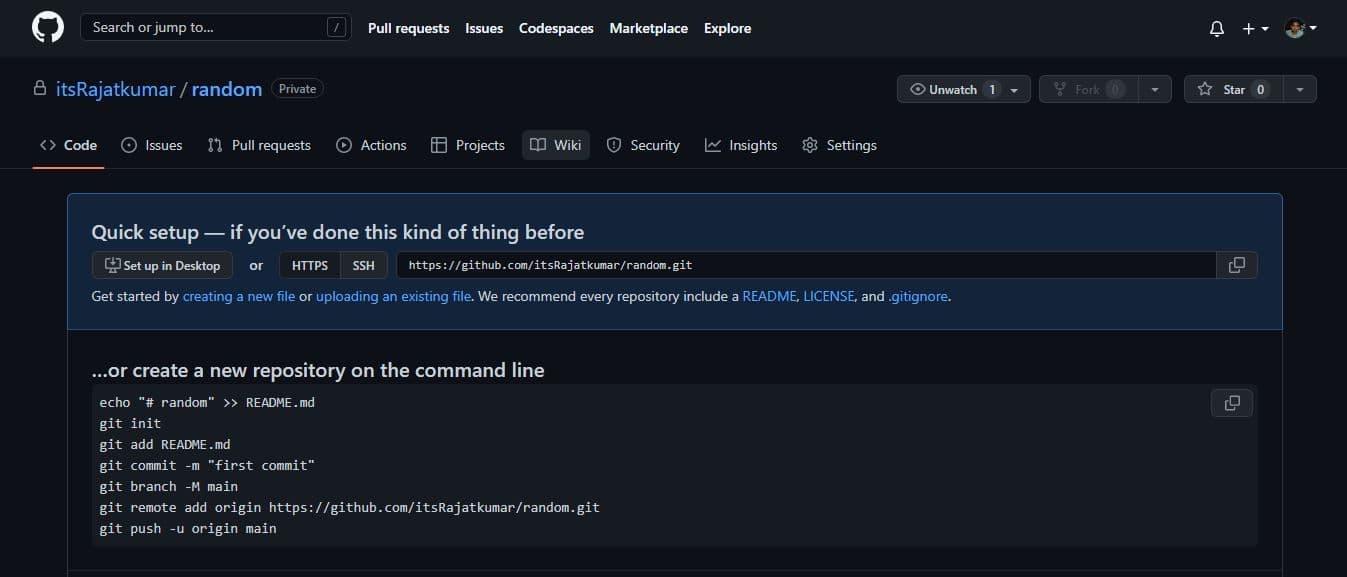
After your repository has been successfully created, you should see a page
Pushing the React app to the GitHub repository
Now that the GitHub remote repository is set up, the next step is to initialize Git in the project.
Tracking and syncing changes
Initialize Git with the following command:
git initPushing the code to the GitHub repo
Now, we’ll commit our code and push it to GitHub. To do this, simply copy and paste the commands received when we created a new repository (see the above screenshot).
git commit -m "first commit"
git branch -M main
git remote add origin https://github.com/nelsonmic/testxx.git
git push -u origin main
Adding the GitHub Pages dependency package
Next, we’ll install the gh-pages package in our project. The package allows us to publish build files into a gh-pages branch on GitHub, where they can then be hosted.
Install gh-pages as a dev dependency via npm:
npm install gh-pages --save-devAdding the deploy scripts
Now, let’s configure the package.json file so that we can point our GitHub repository to the location where our React app will be deployed.
We’ll also need to add predeploy and deploy scripts to the package.json file. The predeploy script is used to bundle the React application; the deploy script deploys the bundled file.
In the package.json file, add a homepage property that follows this structure: https://github-username}.github.io/{repo-name}
Now, let’s add the scripts.
In the package.json file, scroll down to the scripts property and add the following commands:
"predeploy" : "npm run build",
"deploy" : "gh-pages -d build",
That’s it! We‘ve finished configuring the package.json file.
Committing changes and pushing code updates to the GitHub repo
Now, let’s commit our changes and push the code to our remote repository, like so:
git add .
git commit -m "setup gh-pages"
git push
We can deploy our React application by simply running:
npm run deploy
This will create a bundled version of our React application and push it to a gh-pages branch in our remote repository on GitHub.
To view our deployed React application, navigate to the Settings tab and click on the Pages menu. You should see a link to the deployed React application.
Conclusion
GitHub Pages is easy to get started with and free to use, making it a very attractive option for developers of all skill levels.